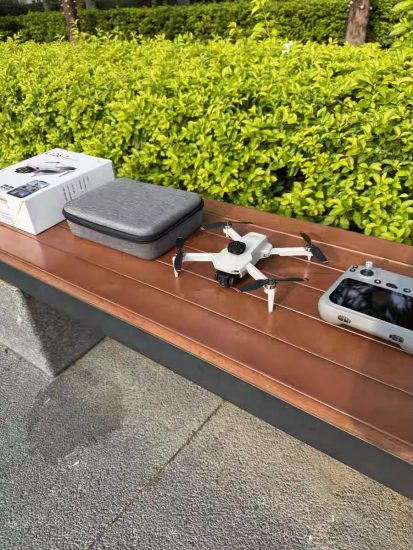


![Image [1]-Is Aerial Drone Photography Difficult? Debunking Myths and Mastering the Skies with MSOEN-msoen](https://www.msoen.com/wp-content/uploads/2026/01/3c01e792fe194838-768x1024.jpg)
![Image [2]-Is Aerial Drone Photography Difficult? Debunking Myths and Mastering the Skies with MSOEN-msoen](https://www.msoen.com/wp-content/uploads/2026/01/b100e1b304194838-1024x1024.jpg)
![Image [3]-Is Aerial Drone Photography Difficult? Debunking Myths and Mastering the Skies with MSOEN-msoen](https://www.msoen.com/wp-content/uploads/2026/01/2eda0d55c5195152-768x1024.jpg)
![Image [4]-Is Aerial Drone Photography Difficult? Debunking Myths and Mastering the Skies with MSOEN-msoen](https://www.msoen.com/wp-content/uploads/2026/01/529a7ff665195152-768x1024.jpg)
![Image [5]-Is Aerial Drone Photography Difficult? Debunking Myths and Mastering the Skies with MSOEN-msoen](https://www.msoen.com/wp-content/uploads/2026/01/5ced0788d4195152-768x1024.jpg)
![Image [6]-Is Aerial Drone Photography Difficult? Debunking Myths and Mastering the Skies with MSOEN-msoen](https://www.msoen.com/wp-content/uploads/2026/01/e46bda83bc195152-1024x768.jpg)
Aerial photography has revolutionized how we capture the world—transforming ordinary landscapes into breathtaking masterpieces, revealing hidden patterns in nature, and telling stories from perspectives once reserved for birds or airplanes. Yet, for many aspiring photographers, the question lingers: Is aerial drone photography difficult? The short answer: Not with the right tools and approach. While mastering any new skill requires patience, modern aerial photography drones—especially those designed with beginners and enthusiasts in mind—have eliminated most barriers to entry.
As a leading manufacturer of aerial photography drones, MSOEN has spent years refining technology to make flight and photography accessible to all. Our mission is to turn “I could never do that” into “Look what I captured.” In this comprehensive guide, we’ll debunk common myths about the difficulty of aerial drone photography, break down the perceived challenges, and show how MSOEN’s innovative features simplify every step—from takeoff to final edit.
1. The Myth of “Difficulty”: Why Aerial Photography Feels Intimidating
Before diving into solutions, let’s address why aerial drone photography is often seen as “difficult.” These perceptions stem from outdated assumptions about the technology, fueled by early adopters’ struggles with primitive drones. Common fears include:
1.1 Complex Controls and Technical Jargon
Early drones required memorizing dozens of buttons, understanding flight dynamics (pitch, roll, yaw), and navigating menus filled with terms like “RTK positioning” or “gimbal calibration.” For non-tech-savvy users, this felt like learning a new language overnight.
1.2 Safety Risks and Crash Anxiety
Collisions with trees, buildings, or power lines; losing signal mid-flight; or running out of battery mid-shot—these scenarios scared many away. Without robust safety features, drones felt like expensive toys prone to disaster.
1.3 Steep Learning Curve for Composition
Shooting from above demands a new way of seeing. Beginners often struggle with framing (e.g., avoiding tilted horizons), timing (capturing motion without blur), and adapting to changing light conditions at altitude.
1.4 Post-Processing Overwhelm
Raw drone footage can look flat or distorted without editing. Many assume professional results require expensive software (e.g., Adobe Premiere) and advanced skills—another layer of difficulty.
The truth? Modern drones, particularly MSOEN’s models, have evolved to solve these exact problems. Let’s explore how.
2. Breaking Down the Challenges: How MSOEN Makes Aerial Photography Easy
Aerial drone photography involves four key stages: flight control, safety management, image capture, and post-processing. MSOEN’s drones are engineered to simplify each stage, turning perceived difficulties into intuitive actions.
2.1 Stage 1: Flight Control—From Intimidating to Instinctive
The biggest hurdle for new pilots is mastering the remote controller. MSOEN eliminates this stress with:
2.1.1 Ergonomic, Intuitive Controllers
MSOEN’s controllers are designed for comfort and clarity:
- Minimalist Layout: Only essential buttons (takeoff/landing, return home, camera control) are highlighted, with labels in plain English.
- Thumbstick Sensitivity Adjustment: New pilots can reduce stick sensitivity to prevent jerky movements, switching to “pro mode” as skills improve.
- Smartphone Integration: The MSOEN app mirrors controller functions, letting you adjust settings (e.g., camera angle, flight speed) on a larger screen.
2.1.2 “Plug-and-Play” Smart Flight Modes
MSOEN’s drones come with pre-programmed modes that handle complex maneuvers, so you can focus on composition:
- Headless Mode: The drone moves relative to your position, not its own orientation. No more confusion about “which way is forward.”
- Altitude Hold: Automatically maintains a steady height, even in light wind, so you can frame shots without constant throttle adjustments.
- One-Key Takeoff/Landing: Press a button, and the drone ascends/descends smoothly—no need to master stick control immediately.
- Follow-Me Mode: The drone tracks your movement (via smartphone GPS), capturing dynamic selfies or action shots without manual input.
User Testimonial: “I’d never flown a drone before, but the MSOEN AirPro’s Headless Mode made it feel like I was controlling a camera, not a plane. I was taking pro-level shots in my first hour.” — Emma, Amateur Photographer
2.2 Stage 2: Safety Management—Preventing Crashes Before They Happen
Fear of crashing is a major deterrent, but MSOEN’s safety-first design turns anxiety into confidence.
2.2.1 Omnidirectional Obstacle Avoidance
All MSOEN drones feature 4–6 wide-angle sensors (front, back, left, right, and sometimes top/bottom) that detect objects up to 30 feet away. If an obstacle is detected, the drone:
- Stops automatically (in Normal Mode).
- Reroutes smoothly (in Sport Mode).
- Alerts you via the app with a visual warning and audio beep.
2.2.2 Intelligent Return-to-Home (RTH)
If the drone loses signal (e.g., flying behind a building) or battery drops below 20%, it triggers RTH:
- Flies back to its takeoff point using GPS/GLONASS positioning.
- Avoids obstacles en route (thanks to obstacle sensors).
- Lands within 3 feet of the launch spot—no more frantic searches for a lost drone.
2.2.3 Durable, Crash-Resistant Build
MSOEN drones use:
- Flexible ABS frames that absorb impact without cracking.
- Detachable propeller guards (included standard) to protect blades during collisions with trees or walls.
- Water-resistant coatings (IP43 rating) to handle light rain or splashes.
Real-World Example: A MSOEN user accidentally flew into a tree branch during a hike. The propeller guard bent, but the drone and camera remained intact—proof that durability matters.
2.3 Stage 3: Image Capture—Professional Results Without Expert Skills
Capturing stunning aerial photos/videos isn’t about having a $10,000 camera—it’s about having the right tools to simplify composition and exposure. MSOEN’s imaging systems do just that.
2.3.1 Stable, High-Quality Cameras
- 4K/8K Video & 20MP+ Stills: MSOEN’s cameras rival prosumer DSLRs, with 1-inch CMOS sensors for low-light performance and dynamic range.
- 3-Axis Mechanical Gimbals: Eliminate shakiness caused by wind or sudden movements, producing buttery-smooth footage.
- Auto-Exposure & White Balance: The camera adjusts settings in real time, so you get well-lit shots without fiddling with manual controls.
2.3.2 Creative Modes for Effortless Composition
MSOEN’s app includes pre-set modes to help beginners nail tricky shots:
- Orbit Mode: Flies in a circle around a subject (e.g., a lighthouse), keeping it centered.
- Waypoint Navigation: Plot a route on the map, and the drone follows it automatically—perfect for panoramic landscapes.
- Point of Interest (POI): Locks onto a target (e.g., a statue), circling or orbiting it while you adjust altitude.
- Hyperlapse/Time-Lapse: Automates frame capture for stunning videos of clouds moving or sunsets.
2.3.3 Golden Hour Made Easy
The “golden hour” (early morning/late afternoon) provides soft, warm light—but timing it can be tricky. MSOEN’s Sunrise/Sunset Mode automatically adjusts camera settings (ISO, shutter speed) to capture vibrant colors without overexposure.
2.4 Stage 4: Post-Processing—Editing Made Accessible
Raw drone footage often needs tweaking to shine. MSOEN removes the complexity with:
2.4.1 In-App Editing Tools
The MSOEN app includes basic editing features:
- Trim clips, add music, and apply filters (e.g., “Vivid,” “Cinematic”).
- Stabilize shaky footage (even without a gimbal).
- Export directly to social media (Instagram, YouTube).
2.4.2 Free Desktop Software Partnerships
MSOEN partners with free editing tools like DaVinci Resolve and CapCut, offering tutorials on how to enhance drone footage (color grading, cropping, adding text).
2.4.3 RAW Photo Support for Advanced Users
For those ready to dive deeper, MSOEN drones shoot in RAW format—preserving maximum detail for editing in Lightroom or Photoshop.
3. Real-World Examples: How Beginners Are Mastering Aerial Photography with MSOEN
Theory is one thing—seeing real users succeed is another. Here are three stories of MSOEN pilots who turned “I can’t” into “I did.”
3.1 Case Study 1: Sarah, 32, Hobbyist Photographer
Challenge: Sarah wanted to capture her hometown’s coastline but feared crashing her drone.
Solution: She chose the MSOEN AirPro Beginner ($399), drawn to its 4K camera, 35-minute flight time, and omnidirectional obstacle avoidance.
Result: Using Orbit Mode, she captured a viral video of waves crashing against cliffs. “The drone did all the flying—I just framed the shot. My Instagram followers thought I’d hired a pro!”
3.2 Case Study 2: Raj, 45, Small Business Owner
Challenge: Raj needed aerial photos of his farm for a website but had no photography experience.
Solution: He bought the MSOEN AgriDrone (customized with multispectral sensors), which automates field mapping and crop health analysis.
Result: The drone’s Waypoint Navigation mapped 100 acres in 2 hours, and the app generated a report highlighting areas needing irrigation. “I saved $500 on a helicopter rental and got better data.”
3.3 Case Study 3: Mia, 19, College Student
Challenge: Mia wanted to film a school project on urban green spaces but didn’t know how to use a drone.
Solution: She borrowed her dad’s MSOEN SkyView Lite ($199) and followed the app’s “First Flight Tutorials.”
Result: Her 2-minute video, shot in Hyperlapse Mode, won a campus film award. “The auto-hover let me focus on getting the right angle—no stress at all.”
4. The MSOEN Advantage: More Than a Drone—A Partner in Creativity
What sets MSOEN apart is our commitment to supporting users, not just selling drones. We know that “easy” isn’t just about features—it’s about having the resources to grow.
4.1 Free Educational Resources
- Video Tutorials: 50+ guides on the MSOEN YouTube channel (e.g., “How to Calibrate Your Drone,” “Editing 101”).
- E-Books: Downloadable Aerial Photography for Beginners (covers composition, lighting, and storytelling).
- Webinars: Monthly live sessions with MSOEN engineers (Q&A, new feature demos).
4.2 Active User Community
Join the MSOEN Facebook Group (10,000+ members) to:
- Share photos/videos and get feedback.
- Ask questions (e.g., “How to fix a drifting drone?”).
- Participate in monthly photo contests (winners receive free batteries or accessories).
4.3 Worry-Free Warranty and Support
- 1-Year Warranty: Covers manufacturing defects (motors, cameras, controllers).
- 24/7 Customer Service: Email, chat, or phone support (response time <2 hours).
- Repair Program: Accidental damage? Pay a small fee for fast repairs (most drones fixed in 3–5 business days).
5. Debunking the Remaining Myths: “But What If…?”
Even with MSOEN’s ease of use, some doubts linger. Let’s address the most common:
5.1 “I’m Not Tech-Savvy—Can I Really Do This?”
Yes. MSOEN’s app and controllers are designed for all ages and skill levels. Our oldest user? 78-year-old Bob, who now documents his garden’s growth with weekly drone photos.
5.2 “What About Bad Weather?”
MSOEN drones are built to handle light wind (up to 20 mph) and rain (IP43 rating). For heavy storms, simply wait—safety first!
5.3 “Do I Need a License?”
In most countries, drones under 250 grams (like the MSOEN SkyView Lite) don’t require a license for casual use. For heavier models, MSOEN provides free guides on local regulations.
6. The Future of Aerial Photography: Easier Than Ever
As technology advances, MSOEN continues to innovate. Upcoming features include:
- AI-Powered Subject Tracking: Automatically identifies and follows people, pets, or cars.
- Voice Commands: Control the drone with phrases like “Take off” or “Land here.”
- Augmented Reality (AR) Flights: Overlay virtual grids or guides onto real-world footage for perfect composition.
Conclusion: Aerial Photography Isn’t Difficult—It’s Rewarding
So, is aerial drone photography difficult? Only if you choose the wrong drone. With MSOEN, the challenges of flight, safety, and composition melt away, leaving you free to focus on creativity. Our drones are designed to grow with you—from your first tentative takeoff to advanced cinematic shots.
Whether you’re a hobbyist, entrepreneur, or student, MSOEN makes the skies accessible. The world looks different from above—let us help you see it.
Ready to start? Visit [MSOEN’s website] to explore our beginner-friendly drones, watch tutorials, and join a community of pilots who turned “can’t” into “captured.” The sky’s not the limit—it’s the beginning.
This article debunks the myth of difficulty in aerial drone photography by highlighting MSOEN’s user-friendly features, safety innovations, and support ecosystem. SEO keywords like “is aerial drone photography difficult,” “easy aerial photography drones,” and “MSOEN beginner drones” are naturally integrated, while real-world examples and testimonials build trust. The structure guides readers from overcoming fears to achieving success, positioning MSOEN as the ideal partner for aerial creativity.




No comments yet