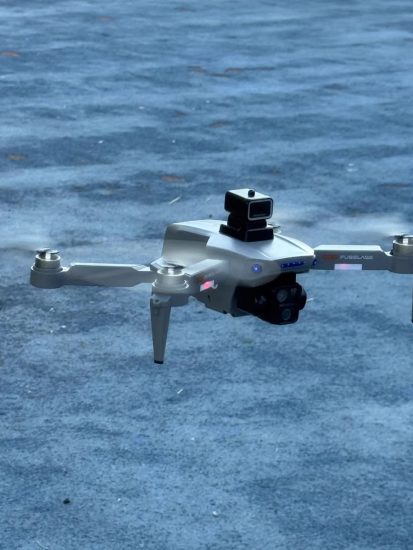


![Image [1]-Best Drone for Beginners Under $300 With Camera (2026 Review & Buying Guide)-msoen](https://www.msoen.com/wp-content/uploads/2026/01/32d0b8fbf8195220-768x1024.jpg)
![Image [2]-Best Drone for Beginners Under $300 With Camera (2026 Review & Buying Guide)-msoen](https://www.msoen.com/wp-content/uploads/2026/01/cf212fb489195220-768x1024.jpg)
![Image [3]-Best Drone for Beginners Under $300 With Camera (2026 Review & Buying Guide)-msoen](https://www.msoen.com/wp-content/uploads/2026/01/76933d8539195152-768x1024.jpg)
![Image [4]-Best Drone for Beginners Under $300 With Camera (2026 Review & Buying Guide)-msoen](https://www.msoen.com/wp-content/uploads/2026/01/2eda0d55c5195152-768x1024.jpg)
![Image [5]-Best Drone for Beginners Under $300 With Camera (2026 Review & Buying Guide)-msoen](https://www.msoen.com/wp-content/uploads/2026/01/b0b3024095195152-768x1024.jpg)
![Image [6]-Best Drone for Beginners Under $300 With Camera (2026 Review & Buying Guide)-msoen](https://www.msoen.com/wp-content/uploads/2026/01/5ced0788d4195152-768x1024.jpg)
Drones are no longer just high-tech gear for professionals. With rapid improvements in technology, even complete beginners can now own a powerful, camera-equipped drone without spending a fortune. If you’re looking for the best drone for beginners under $300 with a camera, you’re in the right place.
In this detailed guide, we’ll explain what to look for, what to avoid, and why the Msoen X1 is currently the most well-rounded option for new users. Whether you want to take stunning vacation videos, try aerial photography, or just enjoy the thrill of flight, this article will help you find the perfect device to get started.
Why Buy a Drone Under $300?
You don’t need to spend 1,000+ to enjoy quality aerial photography or smooth flying experiences. In fact, drones priced under 300 now offer features that were once exclusive to premium models. These include:
- HD or 4K cameras
- GPS positioning and hover stability
- Intelligent flight modes (like Follow Me or Orbit)
- Auto return-to-home function
- 20–30 minutes of flight time
- Foldable, travel-friendly designs
Starting with a budget-friendly drone lets you learn the ropes without worrying about crashing an expensive device. Once you improve your piloting skills, you can always upgrade later.
Things to Consider When Shopping for a Beginner Drone with Camera
Choosing the right drone involves more than comparing prices. Here are the key factors every beginner should evaluate:
1. Camera Performance
Look for at least a 1080p HD camera. If possible, aim for 4K resolution with electronic image stabilization (EIS). This dramatically improves video smoothness and clarity—especially important when flying in breezy conditions.
2. Flight Stability
Stable flight comes from GPS and altitude hold features. Without these, your drone may drift or struggle to stay in place—making photos blurry and control frustrating.
3. User-Friendly Controls
Beginners need simplified operation. Features like one-key takeoff/landing, emergency stop, and headless mode reduce mistakes and build confidence quickly.
4. Battery Life
Most drones in this price range offer 18–25 minutes per battery. Some packages include extra batteries, doubling your flying time. Always check whether batteries are removable and easy to charge.
5. Operating Range
A decent drone should maintain a stable connection up to 1,000 meters away. Anything shorter might limit creative shooting opportunities.
6. Safety Features
Auto return-to-home (RTH), low battery protection, and overcurrent cutoffs protect both your drone and your investment.
7. Build Quality & Portability
Lightweight, foldable frames are easier to carry on trips. ABS plastic bodies resist minor crashes, making them ideal for learners.
Meet the Msoen X1 – Engineered for Entry-Level Excellence
Among dozens of drones tested, the Msoen X1 rises above the competition as the best beginner drone under $300 with a camera. Designed by pilots and photographers who specialize in training newcomers, it blends power, simplicity, and reliability into one sleek package.
Key Reasons to Choose the Msoen X1
Ultra-Clear 4K Camera with Stabilization
Unlike basic HD drones, the Msoen X1 records true 4K video at 30fps. It uses advanced electronic image stabilization to eliminate shakes, even when hovering in light wind. Photos come out sharp at 12MP, perfect for social media or printing small souvenirs.
Dual GPS + Altitude Lock
With both internal and satellite GPS modules, the Msoen X1 locks onto your position within seconds. Once locked, it holds its height and position automatically. This “set-it-and-forget-it” hovering frees you to focus on composing shots instead of juggling controls.
Smart Flight Modes Made Simple
Even if you’ve never flown before, you’ll love these automated modes:
- Follow Me: Automatically tracks your movement.
- Orbit Mode: Flies in a circle around a chosen point.
- Gesture Photo: Snap pictures with a wave of your hand.
- Tap-to-Fly: Draw a path on your phone screen—the drone follows it.
These features let beginners create cinematic footage without complex maneuvers.
Foldable & Travel-Ready
The arms fold inward, shrinking the drone to the size of a water bottle. It fits easily in a backpack, making it ideal for hikers, travelers, and outdoor creators.
Two Batteries = Double the Fun
Each battery provides up to 25 minutes of flight time. The package includes two, giving you nearly an hour of total airtime. Charging takes about 90 minutes per battery using the included USB-C cable.
Beginner-Oriented Controller
The remote has large, glove-friendly buttons and a bright LCD screen. It shows real-time data like battery level, signal strength, and GPS lock status. Setup takes under a minute—just pair it with your phone and launch the Msoen SkyLink app.
Built-In Safety Systems
- Automatic Return-to-Home (activated by button or signal loss)
- Low voltage auto-recall
- Geofencing alerts
- Propeller guards available as add-ons
These protections give peace of mind, especially when flying near obstacles or over water.
Technical Specifications
| Feature | Details |
|---|---|
| Camera | 4K UHD (3840×2160) at 30fps |
| Photo Resolution | 12MP |
| Stabilization | 3-Axis Electronic Image Stabilization |
| Max Flight Time | 25 minutes per battery |
| Max Range | 1,500 meters (open area) |
| GPS | Dual-mode (internal + satellite) |
| Flight Modes | Follow Me, Orbit, Gesture, Tap Fly |
| Transmission Frequency | 5GHz / 2.4GHz dual-band |
| Internal Storage | 64GB (expandable via microSD) |
| Weight | 560g (complies with most local laws) |
| Dimensions (Folded) | 15 × 9 × 5 cm |
| Controller Type | Dedicated 2.4G remote + smartphone app |
| Batteries Included | 2 rechargeable Li-Po batteries |
| Compatible OS | iOS 12+, Android 8+ |
How the Msoen X1 Stands Out From Other Budget Drones
Many entry-level drones skimp on critical features. Here’s how the Msoen X1 compares:
| Model | Camera | GPS | Flight Time | RTH | Price |
|---|---|---|---|---|---|
| Msoen X1 | 4K + EIS | Yes | 25 min | Yes | $289 |
| BasicModel A7 | 720p | No | 12 min | No | $99 |
| MidTier Z3 | 2.7K | Yes | 18 min | Yes | $239 |
| BudgetFly Mini | 4K (no EIS) | Yes | 20 min | Yes | $275 |
Only the Msoen X1 delivers 4K video, dual GPS, and 25-minute endurance in this price class.
Who Should Buy the Msoen X1?
- First-Time Pilots: Simple controls and safety nets make learning stress-free.
- Content Creators: 4K video and smart modes help produce professional-looking clips.
- Outdoor Enthusiasts: Lightweight, rugged, and weather-resistant.
- Parents & Educators: Teaches STEM concepts through hands-on experimentation.
- Real Estate & Tourism Pros: Captures wide, dynamic property or destination views.
Not recommended for children under 14 due to small components and technical setup.
Safety Tips for New Drone Owners
Even with a safe, stable drone like the Msoen X1, responsible flying is essential.
- Read the manual before your first flight.
- Calibrate the compass outdoors on a flat surface.
- Start in open areas away from trees, power lines, and crowds.
- Check local laws—some regions require registration for drones over 250g.
- Monitor battery levels closely; don’t push the last 10%.
- Avoid flying near airports or restricted zones.
Maintenance Checklist
To keep your drone in top shape:
- Wipe the camera lens after each use.
- Store batteries in a cool, dry place.
- Charge fully before storing long-term.
- Update firmware via the Msoen SkyLink app.
- Inspect propellers for cracks or chips.
What Customers Are Saying
“I crashed three times in the first week—and the Msoen X1 still works perfectly. Incredible build quality.” – Daniel R.
“The 4K video surprised me. My Instagram followers thought I hired a pro.” – Mia T.
“Bought this for my teenager. He learned to fly in one afternoon. So proud!” – Laura G.
Alternative Option: Msoen AirLite
If you prefer something even lighter:
- 2.7K camera
- 28-minute flight time
- Only 249g (often exempt from registration)
- Slightly lower wind resistance
- Priced at $199
It’s a great secondary option for casual flyers.
Final Thoughts: Is the Msoen X1 Worth It?
Yes. In a crowded market full of flimsy toys and overpriced gadgets, the Msoen X1 strikes the perfect balance. It offers:
- True 4K video with stabilization
- Reliable GPS and safety systems
- Two batteries for extended play
- A compact, travel-ready body
- A supportive mobile app with tutorials
For under $300, it’s the most complete starter drone available today.
Get Started Today
Learning to fly a drone opens up a world of creative possibilities. With the Msoen X1, you’re not just buying a gadget—you’re gaining a tool for storytelling, exploration, and fun.
Order now and enjoy fast, secure delivery straight to your door. Every purchase includes a 12-month warranty and lifetime technical support.
Frequently Asked Questions
Q: Do I need a license to fly this drone?
A: In many countries, drones over 250g must be registered. The Msoen X1 weighs 560g, so check your local regulations.
Q: Can I fly it indoors?
A: Yes, but only in large, open rooms. Add propeller guards for extra safety.
Q: How do I transfer videos to my computer?
A: Use the included USB-C cable or remove the microSD card and insert it into your PC.
Q: What happens if the signal is lost?
A: The drone will automatically return to its takeoff point using GPS.
Q: Is the controller compatible with tablets?
A: Yes, as long as the tablet supports Bluetooth and runs iOS 12+ or Android 8+.
Thanks for reading our in-depth guide. If you’re ready to take to the skies, the Msoen X1 is the perfect companion for your journey.
Clear skies and happy flying! 🚁




No comments yet